
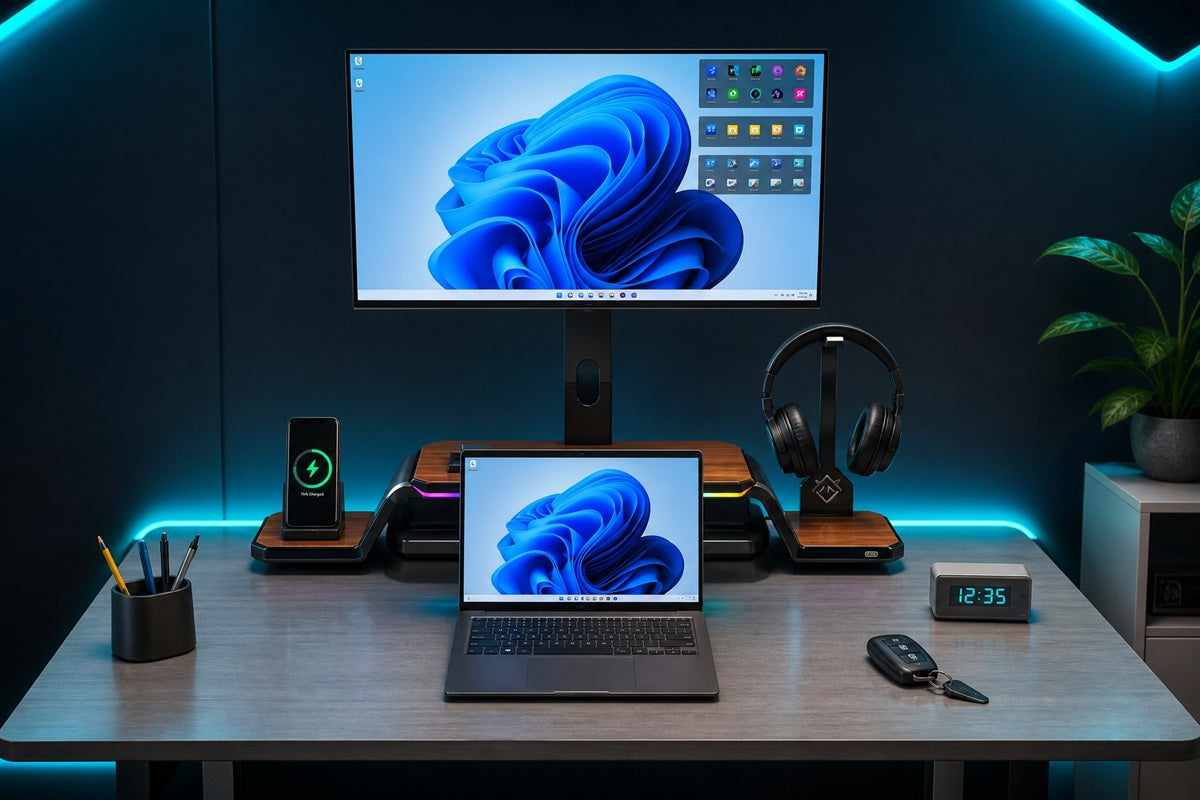
If your desk looks more like a cable graveyard than a workspace, you are not alone. At Guilds, we work with Singapore professionals who want their desk to actually function, not just look presentable, and the fix is rarely a bigger desk. It usually comes down to a handful of the right pieces, positioned correctly. As our range grows to cover more of what a working desk needs, from monitor stands to smaller everyday accessories, the same principle keeps showing up: fewer, better-placed items beat a desk full of mismatched add-ons.
Key Takeaways
-
A clean laptop and monitor setup relies on six core elements: elevation, connectivity, input devices, cable control, lighting, and desk organisation.
-
Screen height matters most. The top of your monitor should sit at or slightly below eye level.
-
Pairing a laptop stand with an external keyboard prevents the "neck-down, wrists-up" posture that causes strain.
-
A monitor stand or arm is usually the single upgrade with the biggest visual and ergonomic payoff.
Why a Clean Setup Is More Than Aesthetic
A messy desk isn't just an eyesore. Screen height, keyboard position, and cable clutter all affect posture and comfort during long work hours.
Using a laptop at a desk without an external keyboard, mouse, or laptop stand often leads to discomfort, since the screen sits too low and the keyboard sits too close.
Many home desks are shared with dining tables, study corners, or compact HDB layouts, which means the furniture wasn't designed around a computer in the first place.
A desk that was never meant to hold a monitor, laptop, and peripherals tends to accumulate cables and loose items fast. Fixing this isn't about buying more things. It's about buying the right things and placing them so each one earns its spot on the desk.
The Desk Essentials Checklist
|
Item |
What It Does |
Why It Matters |
|
Monitor stand or arm |
Raises the screen and frees up desk space |
Improves posture, adds storage underneath |
|
Laptop stand |
Lifts the laptop screen to eye level |
Prevents neck strain from looking down |
|
External keyboard and mouse |
Separates typing from screen viewing |
Enables correct elbow and wrist angles |
|
Docking station or USB hub |
Connects multiple devices through one cable |
Reduces clutter, speeds up daily setup |
|
Cable management (clips, sleeves, trays) |
Bundles and hides wiring |
Keeps the desk surface visually clean |
|
Desk lighting |
Adds even, glare-free illumination |
Reduces eye strain during long sessions |
|
Desk organiser or tray |
Holds small items like pens and cards |
Keeps everyday clutter off the main surface |
Getting the Height and Distance Right
Laptops are convenient for short work sessions, but because the screen and keyboard are fixed together, it is difficult to keep both at a comfortable height and distance simultaneously. That is why an external monitor, paired with a stand, tends to be the single upgrade that makes the biggest difference for daily use.
A simple rule to follow:
-
Screen height: top of the monitor at or just below eye level
-
Distance: roughly an arm's length away, about 50 to 70 centimetres
-
Laptop as second screen: raise it to match your monitor's height using a stand, not the desk surface
-
Tilt: angle the monitor back slightly, around 10 to 20 degrees, to reduce glare from overhead lighting
If you're deciding between a fixed stand, a riser, or a full VESA arm, our guide on monitor stand for desks breaks down which type suits different desk sizes and monitor setups.
Getting this one decision right tends to solve two or three problems at once, since the right stand also creates the storage space that keeps the rest of the desk tidy.
Laptop and Monitor Together: Two Ways to Arrange Them
There's no single correct layout, but most clean setups fall into one of two categories.
Closed Laptop, Single External Display
The laptop stays shut and connects to the monitor and peripherals through a docking station. This frees up the most desk space and keeps the view simple, ideal for anyone using a large or ultrawide monitor, or anyone who prefers a single point of focus while working.
Open Laptop As A Second Screen
The laptop sits beside the monitor, raised to the same height with a stand, and doubles as extra screen real estate for reference material or chat apps. This suits multitaskers who want two active displays without buying a second monitor, and it's a common choice for developers, analysts, and anyone juggling several tools at once.
Either way, an external keyboard and mouse are non-negotiable once the laptop is elevated. Typing on a raised laptop keyboard forces the shoulders up, which defeats the purpose of the stand in the first place.
Taming Cables for a Cleaner Desk

Cable clutter is the fastest way to undo an otherwise tidy setup, even after the height and positioning are sorted. A few habits go a long way:
-
Route cables through a tray or clip system along the back or underside of the desk
-
Use a single hub or dock so only one cable runs to the laptop
-
Keep charging cables separate from data cables to avoid a tangled knot
-
Label or colour-code cables if you're running more than one monitor or docking two devices
None of this needs to be complicated. Even a basic Velcro tie and a rear cable tray can take a desk from chaotic to calm in under ten minutes.
How Guilds Fits Into a Clean Laptop and Monitor Setup
Most of the essentials above are separate purchases. That's normally fine, but it also means more items to coordinate, more cables to route, and more surfaces to keep clean.
The Guilds Altura Monitor Stand (VESA Arm Edition) was built to solve several of these at once rather than add another single-purpose accessory to the desk. It works as a height-adjustable VESA monitor arm, so the screen height and distance guidelines above are handled from the start. Built into the same platform:
-
Height-adjustable VESA arm — supports monitors from 17" to 32", handling elevation and distance in one piece
-
Headphone stand — built into the platform, no separate hook needed
-
Foldable phone stand — tucks away when not in use
-
USB hub — 1× USB-C and 2× USB 3.0, covering most laptop-and-monitor docking needs
-
Flexible platform space — doubles as usable desk surface for a closed-laptop layout, an existing monitor stand, or a dual monitor arm setup
The point is not that every setup needs an all-in-one stand. It is that the essentials above (elevation, connectivity, and cable control) often collapse into fewer physical pieces once the right stand is in place, which is a large part of what makes a desk feel clean rather than merely tidy.
Common Mistakes to Avoid
-
Placing a monitor stand that's too short, so the head still tilts down
-
Using a laptop stand without an external keyboard, which raises the shoulders instead of relieving them
-
Overloading the space under a monitor stand until it looks cluttered again
-
Ignoring desk lighting, which contributes to eye strain even with a perfectly positioned screen
-
Running cables loosely across the desk instead of behind or underneath it
What You Need for a Clean Laptop Monitor Desk Setup
A clean laptop monitor desk setup doesn't come down to one big purchase. It's elevation, connectivity, input devices, and cable control working together, and for most desks, the monitor stand or arm is the single decision that pulls the rest into place.
Start with screen height and distance, add an external keyboard once the laptop is raised, and route cables before loose wires become a habit you stop noticing.
If you would rather solve several of these at once instead of piecing them together, take a look at the Guilds Altura Monitor Stand or get in touch and we will help you build a setup that fits your desk and your workflow, including the smaller accessories worth adding as your desk earns its keep.
Frequently Asked Questions
What's the ideal monitor height for a desk setup in Singapore?
The top of the screen should sit at or slightly below eye level, about an arm's length away. A stand or arm is usually the easiest way to correct for a desk that's the wrong height.
Can I use a laptop and monitor setup without a docking station?
Yes, though a docking station or USB hub makes daily use much simpler by reducing the need for separate cables.
Is a monitor arm better than a monitor stand?
Stands offer stable elevation and storage underneath; arms free up more desk space and adjust more flexibly. The better choice depends on your desk size and how often you reposition the screen.
How much desk space do I actually need for this setup?
Less than most people expect. A compact single-monitor setup can fit on desks as narrow as 100 to 120cm, as long as cables are managed rather than left loose. Two monitors side by side generally need around 110 to 120cm of width once bezels and a small gap are factored in.
What accessories are worth adding beyond a monitor stand?
Once elevation, connectivity, and cable control are sorted, small accessories tend to make the biggest difference: a soft desk mat that protects the surface and keeps a mouse quiet, a compact desk lamp for warmer evening light, and a proper cleaning kit for screens and matte finishes.
Best Monitor Mount Options for Deep Desks and Ultrawide Screens
Best Monitor Stand for Small Desks in Singapore: What Actually Fits?